<?php
// Gribbity Grabbity that's not a battery
// RELEASE v1.2.0
session_start();
// require_once "./Resources/config.php";
// These vars will be grabbed from db eventually to enable faster modifications to the whole site.
// Technically just for experimentation with site design, but could be kept for production build.
// Primary content:
$primaryBG = "#020202"; // Very dark grey (nearly black)
$primaryC = "#ffffff"; // White
// Site stuff:
$siteName = "Ventus";
$logoSubtext = "Exploring alternate classification methods.";
// Other:
$adminURLC = "#f585ff"; // Admin URL color (set to pink)
$navBG = ""; // Nav bar background color (not implemented)
$navC = ""; // Nav bar text color (not implemented)
// For enforcing font usage, made into a variable for things where there isn't a quote left to use.
$montserrat = "font-family: 'Montserrat', sans-serif !important;";

// Footer content:
$ftBG = "#151515"; // Dark Grey
$ftBG2 = "#101010"; // Darker grey
$ftC = "#ffffff"; // White
$ftC2 = "#fefefe"; // Very light grey
// Footer link extensions
$liEXT = "dylanjhbuchanan"; // LinkedIn extension
$ghEXT = "BehemothNano"; // GitHub extension
?>
<!doctype html>
<html lang="en" dir="ltr">
  <head>
    <meta charset="utf-8">
    <meta name="viewport" content="width=device-width, initial-scale=1">
    <?php echo "<title>$siteName - Update 2</title>"; ?>
    <link href="https://cdn.jsdelivr.net/npm/bootstrap@5.3.2/dist/css/bootstrap.min.css" rel="stylesheet" integrity="sha384-T3c6CoIi6uLrA9TneNEoa7RxnatzjcDSCmG1MXxSR1GAsXEV/Dwwykc2MPK8M2HN" crossorigin="anonymous">
    <script src="https://cdn.jsdelivr.net/npm/bootstrap@5.3.2/dist/js/bootstrap.bundle.min.js" integrity="sha384-C6RzsynM9kWDrMNeT87bh95OGNyZPhcTNXj1NW7RuBCsyN/o0jlpcV8Qyq46cDfL" crossorigin="anonymous"></script>
    <link rel="preconnect" href="https://fonts.googleapis.com">
    <link rel="preconnect" href="https://fonts.gstatic.com" crossorigin>
    <link href="https://fonts.googleapis.com/css2?family=Montserrat:ital,wght@0,100;0,200;0,300;0,400;1,100;1,200;1,300;1,400&display=swap" rel="stylesheet">
    <link href="../../../Resources/global.css" rel="stylesheet">
    <script defer type="text/javascript" src="../../../Resources/global.js"></script>
  </head>
  <?php
  echo "
  <body style='background-color: $primaryBG; color: $primaryC; $montserrat font-weight: 200;'>
  ";
  ?>
    <div id="contextOverlay" class="overlay" onclick="overlay('contactOverlay', 0)">
      <div class='d-flex justify-content-center overlayText'>
        <h2 class='ms-4' id='contact' style="font-family: 'Montserrat', sans-serif !important;">Contact Us:</h2>
      </div>
      <div class='wrapper d-flex justify-content-center overlayText'>
        <?php
          echo "
          <form action='../../../contact.php' method='post' style='$montserrat'>
            <div class='form-group ms-4'>
              <label for='msg'>Message:</label><br />
              <input type='text' name='msg' value=''>
              <br />
              <br />
              <label for='name'>Email:</label><br />
              <input type='text' name='name' value=''>
              ";
          if (isset($_SESSION['userID'])) {
            $authorID = $_SESSION['userID'];
            echo "
              <input type='hidden' name='authorID' value='$authorID'>
            ";
          }
          echo '
            </div>
          </form>
          ';
        ?>
      </div>
    </div>
    <?php
      if (isset($_SESSION["fatal"]) && $_SESSION["fatal"]) {
        if (isset($_SESSION['failureMSG'])) {
          $failureMSG = $_SESSION['failureMSG'];
        } else {
          $failureMSG = "An error occured. Please try again later.";
        }
        echo "
        <div class='alert alert-dismissible fade show' style='background-color: #ff6e7c; color: #96181e; $montserrat' role='alert'>
          $failureMSG
          <button type='button' class='btn-close' data-bs-dismiss='alert' aria-label='Close' style='$montserrat'></button>
        </div>
        <br />
        <br />
        ";
        $_SESSION["fatal"] = false;
        $_SESSION["failureMSG"] = "";
      }
      if (isset($_SESSION["oSuccess"]) && $_SESSION["oSuccess"]) {
        if (isset($_SESSION['successMSG'])) {
          $successMSG = $_SESSION['successMSG'];
        } else {
          $successMSG = "Operation successful.";
        }
        echo "
        <div class='alert alert-dismissible fade show' style='background-color: #abedbb; color: #5cb85c; $montserrat' role='alert'>
          $successMSG
          <button type='button' class='btn-close' data-bs-dismiss='alert' aria-label='Close' style='$montserrat'></button>
        </div>
        <br />
        <br />
        ";
        $_SESSION["oSuccess"] = false;
        $_SESSION["successMSG"] = "";
      }
    ?>
    <div style="text-align: center; font-family: 'Montserrat', sans-serif !important; font-size: 80px; font-weight: 300;">
      <?php
        echo "
        <p class='mtsrt' style='display: inline; $montserrat'>$siteName</p>
        <p class='mtsrt' style='font-size: 16px !important; $montserrat'>$logoSubtext</p>
        ";
      ?>
    </div>
    <nav class="navbar navbar-expand-lg" style="background-color: #101010; font-family: 'Montserrat', sans-serif !important;">
      <div class="container-fluid">
        <button class="navbar-toggler" type="button" data-bs-toggle="collapse" data-bs-target="#navbarSupportedContent" aria-controls="navbarSupportedContent" aria-expanded="false" aria-label="Toggle navigation">
          <span class="navbar-toggler-icon"></span>
        </button>
        <div class="collapse navbar-collapse" id="navbarSupportedContent" style="font-family: 'Montserrat', sans-serif !important;">
          <ul class="navbar-nav me-auto mb-2 mb-lg-0">
            <li class="nav-item">
              <a class="nav-link navbar-brand" style="color: #ffffff;" aria-current="page" href="../../../home.php">Home</a>
            </li>
            <li class="nav-item">
              <a class="nav-link" style="color: #ffffff;" href="../../../projects.php">My Work</a>
            </li>
            <li class="nav-item">
              <a class="nav-link" style="color: #ffffff;" href="../../../news.php">News</a>
            </li>
          </ul>
          <li class="nav-item dropstart me-4" style="list-style: none;">
            <a class="nav-link" style="color: #ffffff;" href="#" role="button" data-bs-toggle="dropdown" aria-expanded="false">
              Menu
            </a>
            <ul class="dropdown-menu">
              <li><a class="dropdown-item" onclick="overlay('contactOverlay', 1)" style="font-family: 'Montserrat', sans-serif !important; font-weight: 200 !important;">Contact</a></li>
              <li><a class="dropdown-item" onclick="overlay('supportOverlay', 1)" style="font-family: 'Montserrat', sans-serif !important; font-weight: 200 !important;">Support</a></li>
              <li><a class="dropdown-item" href="../../../settings.php" style="font-family: 'Montserrat', sans-serif !important; font-weight: 200 !important;">Settings</a></li>
              <li><hr class="dropdown-divider"></li>
              <?php
                if (isset($_SESSION["loggedIn"]) && $_SESSION["loggedIn"]) {
                  if ($_SESSION["scope"] == "admin") {
                    echo "
                    <a class='dropdown-item' style='color:$adminURLC; $montserrat font-weight: 200 !important;' href='../../../Helpers/edit-announcements.php'>Edit Announcements</a>
                    <a class='dropdown-item' style='color:$adminURLC; $montserrat font-weight: 200 !important;' href='../../../Helpers/edit-quotes.php'>Edit Projects</a>
                    <div class='dropdown-divider'></div>
                    ";
                  }
                  echo "
                  <li><a class='dropdown-item text-secondary' style='$montserrat font-weight: 200 !important;' href='../../../reset.php'>Reset Password</a></li>
                  <li><a class='dropdown-item text-danger' style='$montserrat font-weight: 200 !important;' href='../../../logout.php'>Log Out</a></li>
                  ";
                } else {
                  echo "
                  <li><a class='dropdown-item text-secondary' style='$montserrat font-weight: 200 !important;' href='../../../login.php'>Log In</a></li>
                  <li><a class='dropdown-item text-primary' style='$montserrat font-weight: 200 !important;' href='../../../register.php'>Sign Up</a></li>
                  ";
                }
              ?>
            </ul>
          </li>
        </div>
      </div>
    </nav>
    <div class="ms-4 me-4" style='font-family: "Montserrat", sans-serif !important;'>
      <h1 style='font-size: 60px !important; font-family: "Montserrat", sans-serif !important; font-weight: 200 !important;'>
        Update 2: Redesigning the classification software.
      </h1>
      <p class='ms-2 me-2' style='font-size: 36px !important; font-family: "Montserrat", sans-serif !important; font-weight: 300 !important;'>
        Intro
      </p>
      <p class='ms-2 me-2' style='font-size: 18px !important; font-weight: 100 !important;'>
        One thing I quickly realized while working on this project was how hard it actually is to accurately detect people through really dense 
        foliage/lots of obstructions. My solution for this was to create a stack of models as opposed to a single generalized model to achieve better results.
      </p>
      <br />
      <p class='ms-2 me-2' style='font-size: 36px !important; font-family: "Montserrat", sans-serif !important; font-weight: 300 !important;'>
        The Stack
      </p>
      <p class='ms-2 me-2' style='font-size: 18px !important; font-weight: 100 !important; font-family: "Montserrat", sans-serif !important;'>
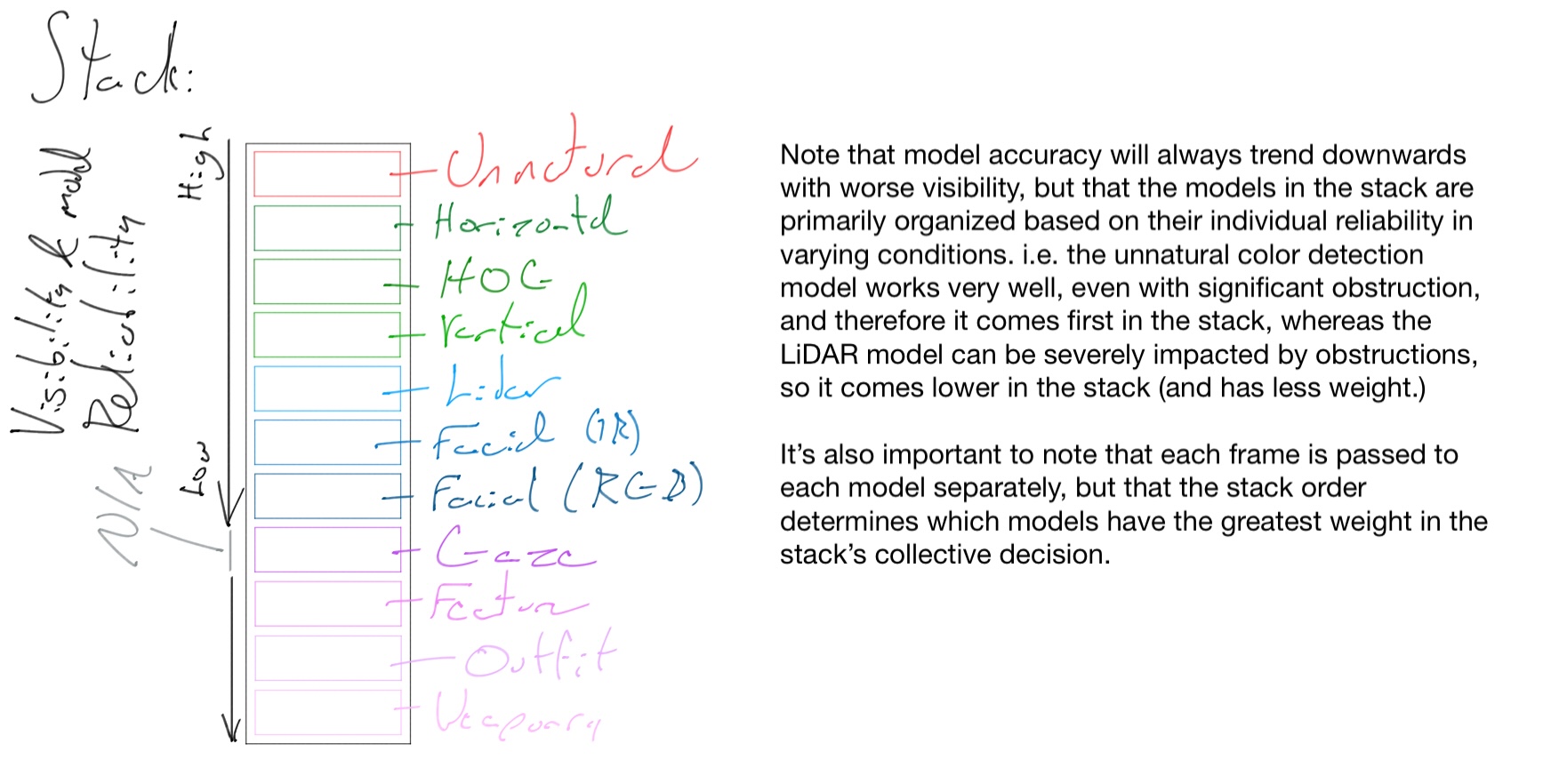
        The stack consists of 11 primary models for classification/tracking, each of which as a specific task. The models are as follows (though note that the 
        order here doesn't really matter): <br />
        <div class="ms-4 me-4 mt-0 mb-0" style='font-size: 18px !important; font-weight: 100 !important; font-family: "Montserrat", sans-serif !important;'>
          1. Unnatural color detection<br />
          2. Outfit detection<br />
          3. Facial (IR)<br />
          4. Facial (RGB)<br />
          5. Feature detection<br />
          6. Gaze detection<br />
          7. Histogram of Oriented Gradients (in this case, checks that target is shaped like a human)<br />
          8. LiDAR<br />
          9. Vertical (top-down) human detection<br />
          10. Horizontal human detection<br />
          11. Weaponry detection<br />
        </div>
        <br />
        <p style='font-size: 18px !important; font-weight: 100 !important; font-family: "Montserrat", sans-serif !important;'>
          The stack itself is simply an instance of each model, ordered based on the weight each model has (based on model reliability in varying conditions.)
          It's a lot easier to use diagrams to explain this, so I've made a few (somewhat terrible) diagrams.
        </p>
        <img src="../images/stack_diagram.jpeg" alt="Model stack diagram" style="width: 65%; height: auto;">
        <p style='font-size: 10px !important; font-family: "Montserrat", sans-serif !important; font-weight: 100 !important; font-style: italic !important;'>
        Model stack diagram. Copyright (c) Dylan Buchanan. All Rights Reserved.
        </p>
        <p style='font-size: 18px !important; font-weight: 100 !important; font-family: "Montserrat", sans-serif !important;'>
          The diagram above shows that stack, though is a bit useless on its own. The general idea here is just to establish the idea of the model stack as an 
          object so that it'll make more sense later on.
        </p>
      </p>
      <br />
      <p class='ms-2 me-2' style='font-size: 36px !important; font-family: "Montserrat", sans-serif !important; font-weight: 300 !important;'>
        The Setup
      </p>
      <p class='ms-2 me-2' style='font-size: 18px !important; font-weight: 100 !important; font-family: "Montserrat", sans-serif !important;'>
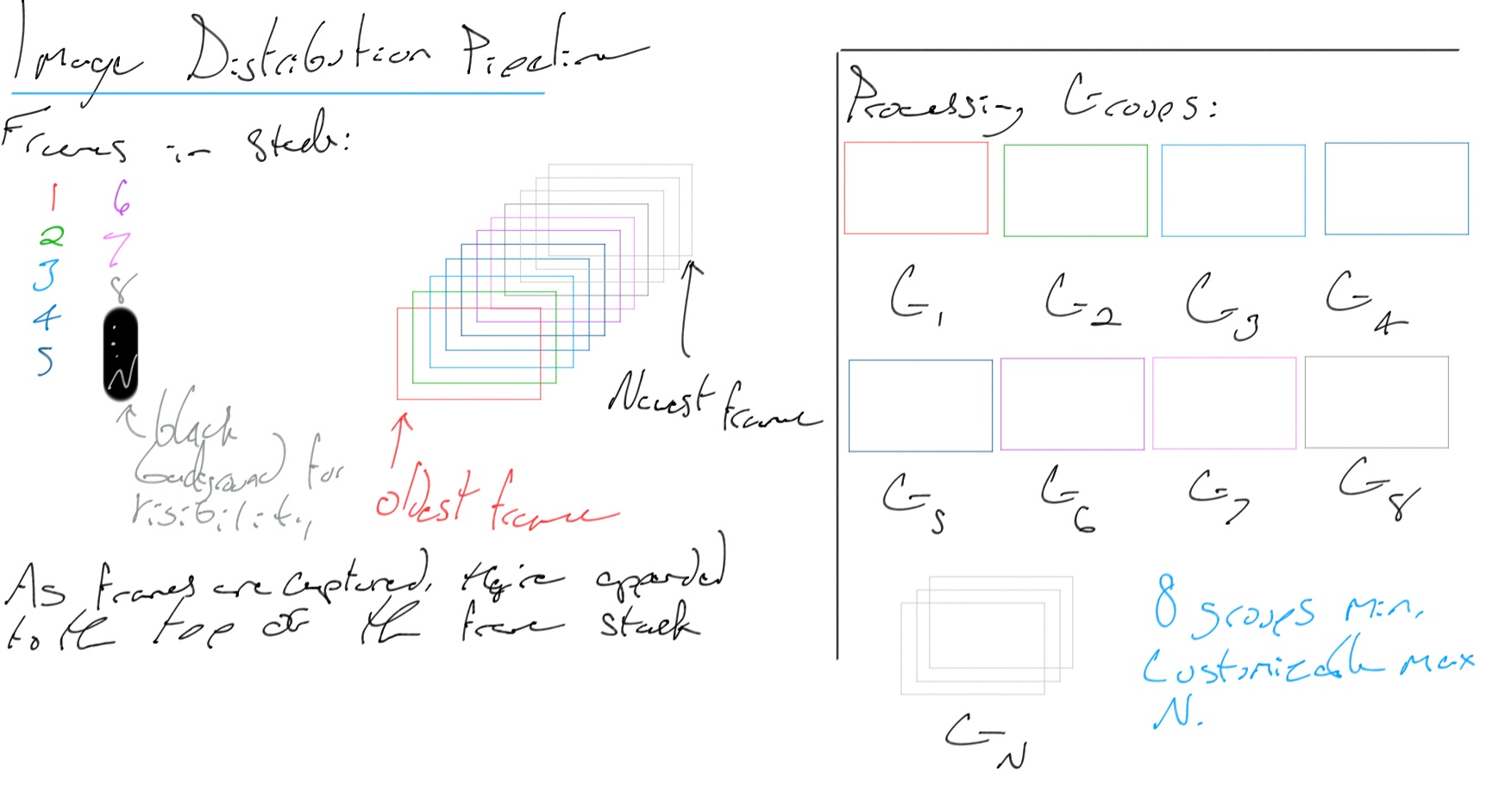
        Now that you hopefully understand the model stack structure, let's move on to the rest of the setup. Individual frames (images) are placed 
        into a stack (the frame buffer) from the video stream. The frame buffer has the oldest frames on the bottom, while the newer ones are placed 
        on the top - it's a standard stack. A number of groups are created - anywhere from 8 to as many as your machine can handle - which are 
        responsible for processing any frames sent their way. Each group runs a model stack (not to be confused with an actual stack data structure, 
        or the frame buffer I just mentioned.) <br /> <br />
        This is the setup (the title of the diagram is slightly off since this particular one doesn't show the entire pipeline):
        <img src="../images/img_dist_diagram.jpeg" alt="Frame distribution setup diagram" style="width: 65%; height: auto;">
        <p style='font-size: 10px !important; font-family: "Montserrat", sans-serif !important; font-weight: 100 !important; font-style: italic !important;'>
        Frame distribution setup diagram. Copyright (c) Dylan Buchanan. All Rights Reserved.
        </p>
        <br />
        <p style='font-size: 18px !important; font-weight: 100 !important; font-family: "Montserrat", sans-serif !important;'>
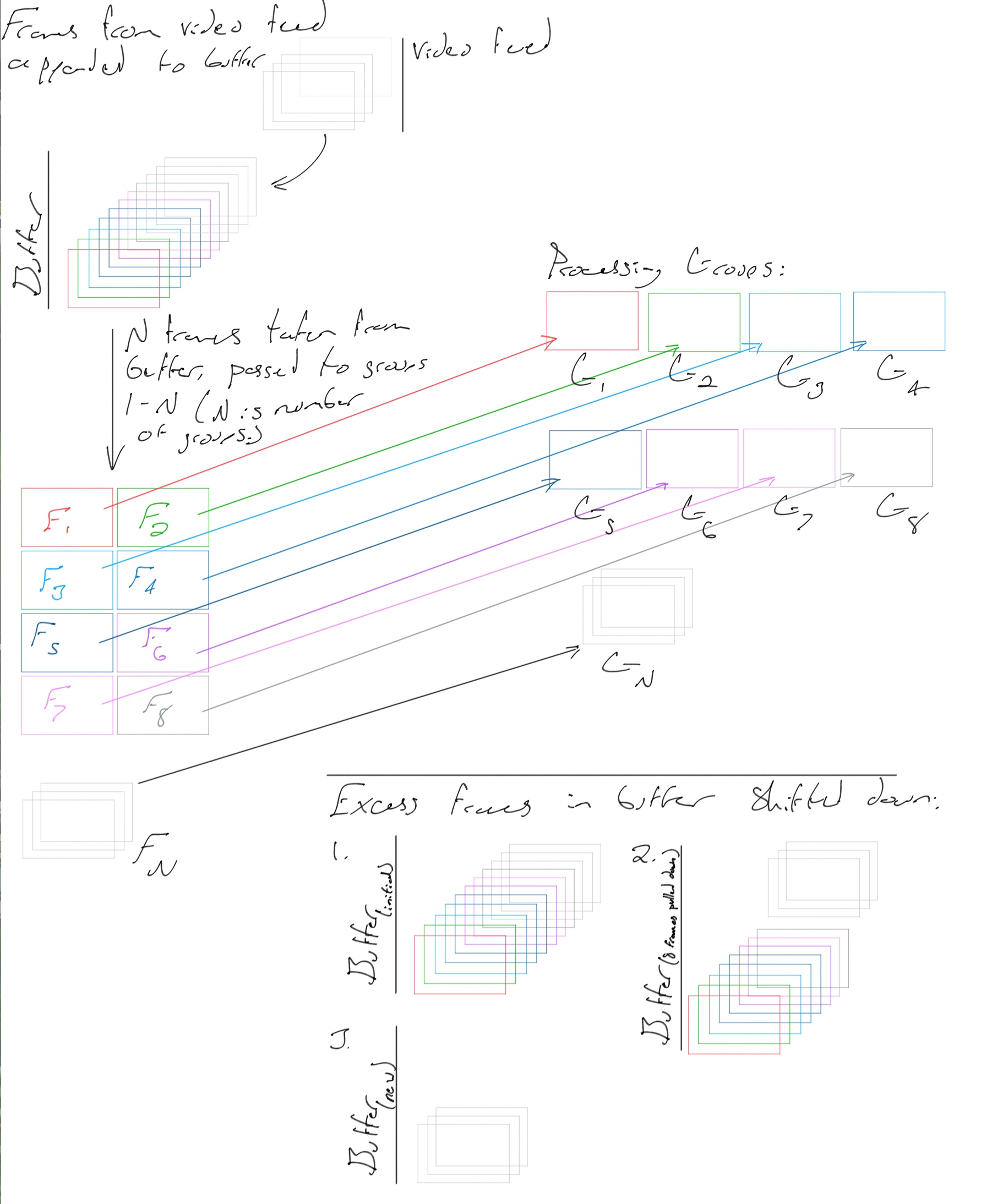
          Frames are actually distributed to the groups as shown below. After a batch of frames is sent out, the frame buffer contains N less frames 
          (where N is the number of groups.)
        </p>
        <img src="../images/video_to_groups_diagram.jpeg" alt="Frame pipeline diagram" style="width: 65%; height: auto;">
        <p style='font-size: 10px !important; font-family: "Montserrat", sans-serif !important; font-weight: 100 !important; font-style: italic !important;'>
          Frame distribution diagram. Copyright (c) Dylan Buchanan. All Rights Reserved.
        </p>
        <br />
        <p style='font-size: 18px !important; font-weight: 100 !important; font-family: "Montserrat", sans-serif !important;'>
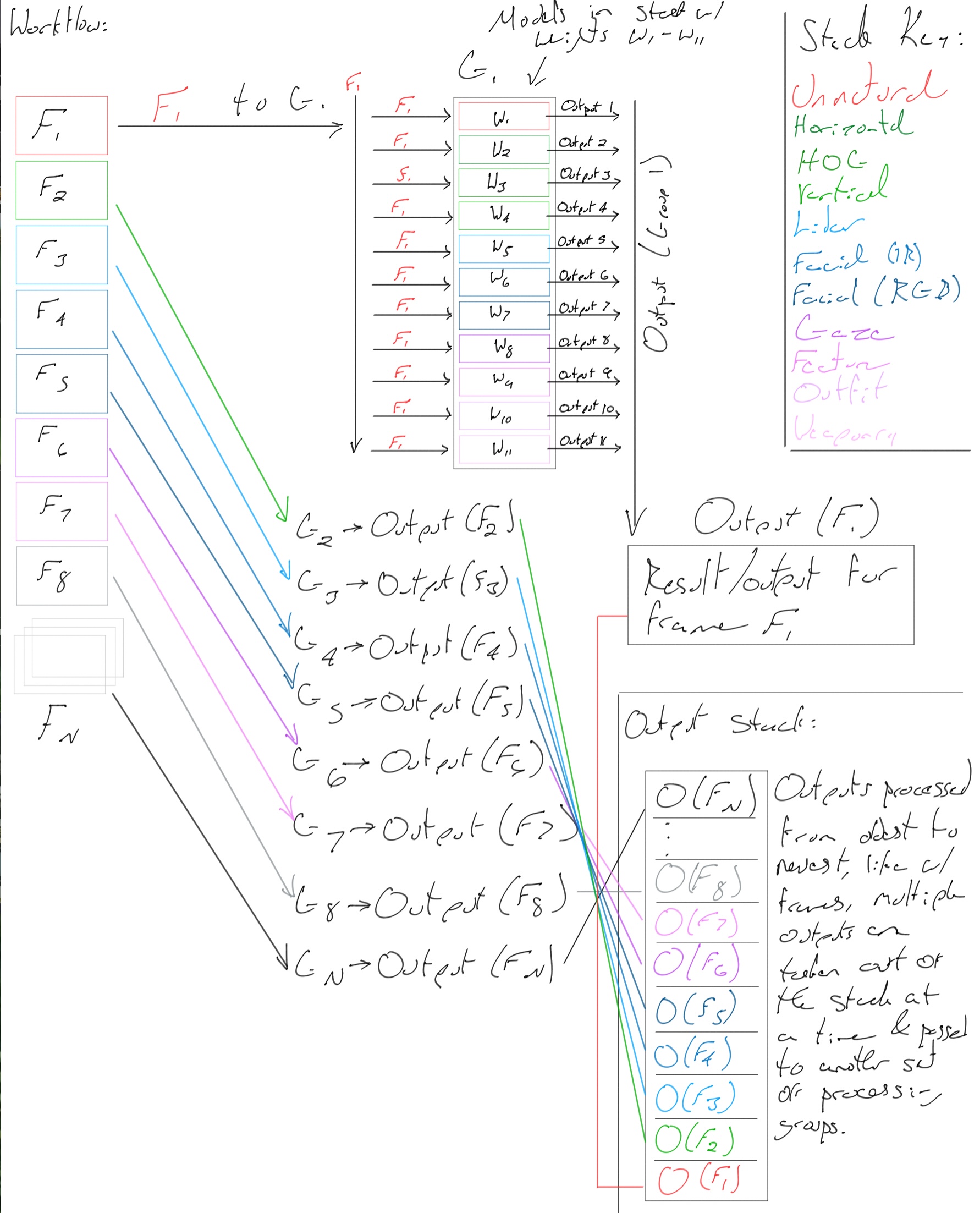
        And lastly, the diagram detailing the entire workflow from frame buffer to results.
        </p>
        <img src="../images/workflow_diagram.jpeg" alt="Full workflow diagram" style="width: 65%; height: auto;">
        <p style='font-size: 10px !important; font-family: "Montserrat", sans-serif !important; font-weight: 100 !important; font-style: italic !important;'>
        Overall workflow diagram. Copyright (c) Dylan Buchanan. All Rights Reserved.
        </p>
        <br />
        <p style='font-size: 18px !important; font-weight: 100 !important; font-family: "Montserrat", sans-serif !important;'>
          One thing to note that I didn't bother trying to include in the diagrams is that there are two very important clocks that are running in the 
          background throughout the classification process. The first tracks the rate at which frames are being classified (across all groups). The 
          second tracks the rate at which results are being processed/instructions are being sent to the drone. If the classification rate falls behind 
          the video frame rate, one of two things will happen: 
          <div class="ms-4 me-4 mt-0 mb-0" style='font-size: 18px !important; font-weight: 100 !important; font-family: "Montserrat", sans-serif !important;'>
            a. if the current number of groups is less than the maximum number of groups, X more groups will be added if the following equation is true: 
            <div class="ms-4 me-4 mt-0 mb-0" style='font-size: 18px !important; font-weight: 100 !important; font-family: "Montserrat", sans-serif !important;'>
              ceil(VR/(CR/N)) < NMax
              additional groups X = ceil(N - VR/(CR/N)) | ceil bc we'd rather have a CR > VR rather than the other way around.
              N - number of active groups
              VR - video frame rate
              CR - collective classification rate
              NMax - maximum number of groups
            </div>
            Eg. CR = 40 FPS, N = 8, NMax = 32, VR = 60 FPS: Average group CR = CR/N = 5, therefore while each group is classifying 5 frames per second, to 
            keep up with the 60 fps input from the video stream we'd need 12 (VR/(CR/N)) total groups, and since we already have 8 active groups, we'd need 
            an additional 4 (N - VR/(CR/N)) groups for a combined classification rate across all groups of 60 frames per second. Since our maximum number of 
            groups is set to 32, we can add those four extra groups since the total number of groups we'll need (VR/(CR/N)) is 12, which is less than 32. <br />
            b. Frames will be skipped to allow the current number of groups to have a classification rate equal to the partial frame rate. i.e. if the current
            classification rate = 10 fps & the native video frame rate is 60 fps, we should only look at every 1 in 6 frames since we can't add extra groups 
            to compensate. This situation isn't ideal, but it's better than just getting farther and farther behind as frames continue to be captured at the 
            video frame rate. <br />
          </div>
        </p>
      </p>
      <br />
      <p class='ms-2 me-2' style='font-size: 36px !important; font-family: "Montserrat", sans-serif !important; font-weight: 300 !important;'>
        Summary
      </p>
      <p class='ms-2 me-2' style='font-size: 18px !important; font-weight: 100 !important;'>
        To summarize, the new system utilizes multithreading with a dynamic set of groups (each of which runs its own model stack) to make classification significantly more 
        efficient. Aside from making classification and autopilot/tracking generally more responsive, it significantly increases reliability since 
        processes will theoretically always be up to date, even if it means skipping a few frames here and there. <br /> Of course it would be ideal to never have to skip frames 
        (more data is good) but skipping frames keeps us up to date if we can't keep up through sheer compute power alone. It's better to have a drone that's mostly sure 
        it's following/watching a person than to have a drone that is figuratively 10 steps behind the person, and will only catch up if they decide to stop (that is if it 
        manages to keep up that ten second delay - if falls further and further behind, it will reach a point at which it is unable to track the person because they've just 
        left.) Skipping frames is a last resort, but it's much better than the alternative. <br /><br /> The other massive benefit with the stack of models is that it 
        allows for significantly better (as in more accurate) results. Having each model look for a specific thing means that they can be trained more (longer) 
        than a generalized model that has a rough idea of what a person looks like. <br /><br /> I briefly want to point out that it's also really important to remember that with a 
        singular generalized model, our dataset would have to contain images from all sorts of angles with various obstructions, etc. Not only would it be massive, but it would also be 
        extremely difficult to ensure that it has sufficient diversity - it's a lot easier to get pictures of people standing upright in a variety of different surroundings/backgrounds 
        than from a bird's eye view, for example. <br /> For a potentially more concrete example, having a set of models that each detect an attribute of a person also gives us greater 
        control of what the system actually "thinks" a person is: with a generalized model, for all we know a person only counts as a person if there's a bit of foliage covering at least 
        50% of them - which would be a requirement that would've stemmed from a strange trend in the dataset. Not only could it be really difficult to pick up on what this trend might be, 
        we'd have this same problem several times over given the difficulty of getting a dataset sufficiently diverse/varied for our model. <br /><br /> With this new stack-of-several-specialized-models-version, 
        we can effectively tell the system that a person is usually something that looks out of place in its surroundings (unnatural colors), has a general stick figure-like shape (effectively what the 
        HOG detector looks for), has a rough 3d shape as defined by the LiDAR dataset, etc. Overall, this approach provides far better results in all sorts of 
        conditions since there's always models to fall back on if the situation is particularly challenging, and if not, we can go through a more rigorous process 
        to decide whether or not the object in question is a person. <br /><br /> You may have also noticed models like the gaze or weapon detection ones. These are for target 
        tracking & threat assessment, respectively. While they're less accurate with more obstruction, (relatively speaking, all models are less accurate with more obstruction 
        between the drone and the target of course) they can still be super helpful in lots of situations. <br /><br /> Another thing to note is that model weights don't entirely 
        depend on their respective reliability, but also on their confidence for each frame. If an inaccurate model is super confident it sees a person, while it's important to 
        consider that it may actually be on to something, and we can take more steps to verify its claim. (It's still important to acknowledge that we know it can be unreliable, and should be treated as such.) 
        This secondary verification process is a bit complicated for a short overview here, so I'll probably go further into it in a future update. In essence, it uses a "decomposition" model that attempts to 
        process different parts of an image based on recent data (from the current task) as well as "knowledge" on what might be a promising region. Effectively feature localization, but a bit more complicated. 
        <br /> There's also support for thermal imaging when additional verification is needed, or as just another model that runs with the rest in the stack. Note that while thermal imaging-based feature localization 
        is absent from the above diagrams, it is still fully supported. The reason it is absent is because thermal imaging equipment can be expensive, and the system works without it. I do want to be very clear that it 
        is a better idea to use a thermal-imaging-capable drone for best results, see more about drone selection <a href="../../../ventus-getting-started.php#">here</a>. <br /><br /> I also wanted to briefly mention that 
        the reason for having the multithreaded groups that each run a stack is primarily out of necessity due to having a much more intensive classification process with multiple models, though it is a good idea in general 
        to get a faster overall classification rate.
      </p>
      <br />
      <br />
      <br />
    </div>
    <div class="imgContainer mb-0">
      <img src="../../../Images/Ocean2.jpeg" alt="Download bg image" style="width:100%;">
      <div class="imgCtTxtCntr">
        <a style='font-size: 52px !important; font-family: "Montserrat", sans-serif !important; font-weight: 400 !important; text-align: center;' href='../../../ventus-getting-started.php' target='_blank'>
          Get started with Ventus
        </a>
      </div>
    </div>
    <div style="font-family: 'Montserrat', sans-serif; font-weight: 300;" class='ms-0 mt-0 me-0 mb-0'>
    <?php
      $contactOT = "contactOverlay";
      $contactOS = 1;
      echo "
      <!-- Page Footer -->
      <div style='background-color: $ftBG'>
        <div style='background-color: $ftBG2; color: $ftC2; text-align: center'; class='mb-0'>
          <p style='font-size: 30px; $montserrat font-weight 200 !important;' class='mt-4 mb-3'>Contact:</p>
          <p style='font-size: 18px; $montserrat font-weight 200 !important;'>contact@djhbuchanan.com</p>
          <a style='$montserrat font-weight 200 !important;' onclick='contactOverlay($contactOT, $contactOS)'>Or, send a message</a>
          <hr />
        </div>
        <nav class='navbar navbar-expand-lg mt-0 mb-0' style='background-color: $ftBG; $montserrat font-weight 200 !important;'>
          <div class='container-fluid'>
            <a style='$montserrat font-weight 200 !important;' class='navbar-brand' href='../../../home.php'>
              <!-- Logo icon: <img src='/path/logo.svg' alt='' width='30' height='24'> -->
              <p style='color: $ftC; $montserrat font-weight 200 !important;' class='ms-2 mt-1'>Logo</p>
            <a>
            <div class='navbar-nav'>
              <a class='nav-link' style='color: $ftC; $montserrat font-weight 200 !important;' href='../../../Extras/terms-of-service.php'>Terms of Service</a>
              <a class='nav-link' style='color: $ftC; $montserrat font-weight 200 !important;' href='../../../Extras/privacy-notice.php'>Privacy Notice</a>
              <a class='nav-link' style='color: $ftC; $montserrat font-weight 200 !important;' href='../../../Extras/accessibility.php'>Accessibility</a>
              <a class='nav-link' style='color: $ftC; $montserrat font-weight 200 !important;' href='../../../Extras/site-map.php'>Site Map</a>
              <a class='nav-link' style='color: $ftC; $montserrat font-weight 200 !important;' href='https://github.com/$ghEXT' target='_blank'>GitHub</a>
              <a class='nav-link' style='color: $ftC; $montserrat font-weight 200 !important;' href='https://www.linkedin.com/in/$liEXT' target='_blank'>LinkedIn</a>
            </div>
          </div>
        </nav>
      </div>
      <div style='background-color: $ftBG;'>
        <!-- Bottom Spacer -->
        <br />
      </div>
      ";
    ?>
    </div>
  </body>
</html>

<?php
  // mysqli_close($link);
?>